Showing posts with label Lync Skype4B. Show all posts

Wednesday, 5 October 2016

Change username when UPN and SIP URI are different

I just discussed how to change the username, when the UPN is different from the SIP URI. So I made this post to document my findings.

First sign out from the client (if applicable) and click "Delete My Sign-in Info" 


Confirm you really want to do this


Exit Skype for Business client application

Delete the sip_<username> folder, for Skype for Business 2016 it is in %userprofile%\appdata\Local\Microsoft\Office\16.0\Lync\. It is safe to delete the entire folder, it will be recreated at next logon.

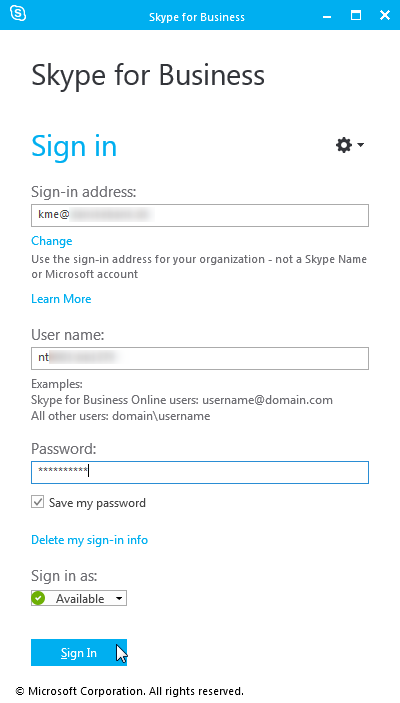
Start Skype for Business client application again, enter password and press Sign In


Confirm you want to save the sign-in info
Oops (as expected)

Enter the UPN or Domain\SAMAccountName in the username field, password and click Sign In

Confirm you want to save the sign-in info

And the client signs in


Thursday, 1 September 2016

Access denied when creating local databases

When I was installing a new Skype for Business Server 2015 frontend server pool for a customer, installation of the Skype for Business components failed with this useless error messages: 0x80004005 (Unspecified error) and failure code 1603 (which is a generic error code).


Digging into the LCSSetup_Commands.log showed this entry:
Creating database rtcdyn from scratch. Data File Path = D:\CsData\RtcDatabaseStore\rtclocal\DynDbPath, Log File Path= E:\CsData\RtcDatabaseStore\rtclocal\DynLogPath.
Exception Stack:
Type: Microsoft.SqlServer.Management.Smo.FailedOperationException, Message: Create failed for Database 'rtcdyn'.
Type: Microsoft.SqlServer.Management.Common.ExecutionFailureException, Message: An exception occurred while executing a Transact-SQL statement or batch.
Type: System.Data.SqlClient.SqlException, Message: CREATE FILE encountered operating system error 5(Access is denied.) while attempting to open or create the physical file 'D:\CsData\RtcDatabaseStore\rtclocal\DynDbPath\rtcdyn.mdf'.
CREATE DATABASE failed. Some file names listed could not be created. Check related errors.
Access denied from the operating system?? Investigating the Security eventlog I found som of these entries: 

Issue is related to insufficient filesystem priviliges.

Checking the filesystem priviliges, I found that the special permissions not granted in the picture above, was missing from the root of the drive. 

How it should look like:


Adding the default user permissions the root of the drive fixed the problem and the installation of the server could continue.

Problem was caused by additional security settings made by the customer.

Wednesday, 3 February 2016

Response group agent state or how to check RGS agent state

A client recently had an issue with a response group (RGS) queue, where the call came nicely into the queue, but the call was not presented to the agents.

A small query into the Skype4B backend database gave us the answer: The agent were not logged into the RGS.

select T1.Name, T3.DisplayName, T4.[State] 
from [rgsconfig].dbo.AgentGroups as T1
join rgsconfig.dbo.AgentGroupsToAgentsMap as T2
on T1.ID = T2.AgentGroupId 
join rgsconfig.dbo.Agents as T3
on T2.AgentId = T3.ID
left join rgsdyn.dbo.AgentGroupSignInStates as T4
on (T2.AgentGroupId = T4.GroupId and T2.AgentId = T4.AgentId)
where T4.[State] in (0,1) and T1.Name like 'servicedesk 1%'
group by T1.Name,T1.ID,T3.DisplayName,T3.ID,T4.[State]

Gave us a nice little list of the users:
State 0 = not logged in
State 1 = logged in
If the user is not in the list, the user has never signed into the response group.


We can see that there are no users active in Servicedesk 1. line group, so this explains why no calls are presented to the agents